Why a Docker image is called an 'image'
A Docker image is not a picture. The word traces through ISO files and CD-ROMs back to the 1960s, when an 'image' meant a faithful, byte-for-byte copy of storage — and the 'ROM' in CD-ROM is the same read-only idea Docker's immutable layers are built on.
AI-assisted postDrafted with help from Claude, edited and fact-checked by Mart. See transparency policy →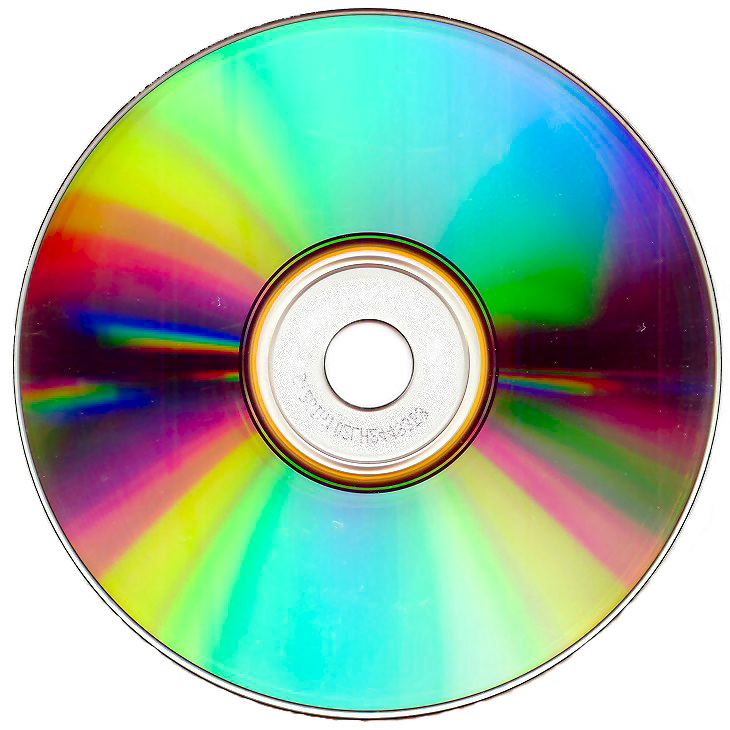
A pressed CD-ROM — read-only by physics, the pits stamped permanent. Docker's image layers inherit the same immutability. Image: "Black and White", Wikimedia Commons, CC BY-SA 3.0.

The word image in "Docker image" confuses almost everyone the first time, because it is not a picture of anything. A Docker image is a packaged, layered filesystem that a container runs from. Calling it an image feels like a category error — until you follow the word backwards. It runs through .iso files, through the CD-ROM, and all the way down to a 1960s mainframe copying a disk onto magnetic tape. By the time you reach the bottom, the name is not just sensible, it is the most precise word available. And the read-only property that defines a Docker image is the same property baked into the "ROM" in CD-ROM. The lineage is real, and it is worth walking.
An image is a faithful copy, not a photograph
The relevant sense of image is the old one: a faithful reproduction, a likeness so exact it stands in for the original. A mirror image. And this is the original sense of the word, not a later one. English image arrived through Old French from the Latin imāgō — "copy, likeness, representation" — which shares a root with imitārī, "to imitate." From the beginning the word meant a faithful likeness of something else: a copy. The photographic sense most people reach for first — image as picture, as JPEG — is a much later narrowing of that meaning. (The idiom "spitting image," meaning an exact likeness, rides the same idea, though its own origin — likely "spit and image," something so identical it is as if spat out of the other — is disputed folk etymology and a separate story.) Computing borrowed the imāgō sense early and literally — an image, in storage terms, is a bit-for-bit copy of some other thing, complete enough that a machine cannot tell the copy from the original.
flowchart TD
    IMIT["Latin <i>imitārī</i><br/>'to imitate'"]
    IMAGO["Latin <i>imāgō</i><br/>'copy, likeness, representation'"]
    OF["Old French <i>image</i>"]
    EN["English 'image'"]
    COPY["sense A: faithful copy / likeness<br/>(the original meaning)"]
    PIC["sense B: picture / photo<br/>(later narrowing)"]
    IMIT --> IMAGO --> OF --> EN
    EN --> COPY
    EN --> PIC
    COPY -.->|"computing keeps this branch"| TECH["storage 'image'"]
The earliest computing use is the core image. In the 1950s and 60s, main memory was magnetic-core memory — tiny ferrite rings, each storing a bit. When a program crashed, the machine would dump the contents of core to storage or to a printer so an engineer could examine it. The dump was called a core image: a frozen, faithful copy of what was in memory at the instant of failure. The term outlived the hardware. Unix still writes a core dump file today, decades after the last ferrite core was retired, and the word "core" inside it is a fossil of 1960s memory technology.
That is the seed of the whole vocabulary: an image is a complete, faithful copy of the contents of a storage device, captured so exactly that it can be restored or run as if it were the original.
The disk image, on a tape, in 1969
The next step is the disk image. By the late 1960s, mainframe operators needed to back up and clone disk media, and the way to do it was a byte-by-byte, sector-by-sector copy of the entire disk — not a copy of the files, but a copy of the disk, including its structure, boot records, free space, and everything else. These early disk images ranged from a few megabytes to a few hundred, and they were written out to magnetic tape.
The distinction between copying files and copying the disk is the whole point. A file copy gives you the documents. A disk image gives you the disk: a thing you can write back onto fresh media to get a bit-identical clone, or later, mount and run as if it were the physical device. The image is the disk, projected into a single file. That meaning — the disk as a file — is exactly what survives into "Docker image": the filesystem as a file.
CD-ROM: the read-only thread begins
Here the second thread enters, the one the name "Docker image" quietly inherits: read-only.
ROM is Read-Only Memory — storage whose contents are fixed at manufacture and cannot be altered afterward. The contents are stamped in; the medium can be read a billion times and written zero. CD-ROM spells out as Compact Disc Read-Only Memory, and the order of that name is the history: the audio Compact Disc came first, standardised by Sony and Philips in the 1980 Red Book and on the market in 1982, as a read-only music format. The CD-ROM was the same physical disc repurposed to carry arbitrary data instead of audio. When Sony and Philips standardised that data disc in the 1983 Yellow Book — the CD-ROM was announced in 1984 and shown publicly by Denon and Sony at a 1985 Japanese COMDEX — the "ROM" was the defining property, bolted onto a medium that had been read-only since its audio days. A pressed CD-ROM is manufactured by stamping physical pits into a master and cloning that master; the pits are the data, and they are permanent. You cannot edit a CD-ROM any more than you can edit a vinyl record. It is read-only by physics, not by policy.
To put a usable filesystem on this read-only medium, the industry needed a standard. The High Sierra Group met in November 1985 at the High Sierra hotel on the Nevada state line, published their proposal in 1986, and it became ISO 9660 — the read-only filesystem of the CD-ROM. (If you care about why "the standard nobody reads" tends to be the one that wins, the POSIX story is the same shape.)
And a complete copy of one of these discs — the entire ISO 9660 filesystem captured as a single file — is called an ISO image, or just "an ISO." Same word, same meaning as the 1969 disk image: the disc, projected into one file, faithful enough to burn back onto blank media or mount directly. The .iso you download to install an operating system is a literal optical-disc image. Read-only, because the disc it images was read-only.
CD-R and CD-RW: writable layers on a read-only idea
The read-only-ness of CD-ROM was a constraint people immediately wanted to escape, and the escape route turns out to mirror how containers work — so it is worth a paragraph.
CD-R (recordable, Sony and Philips) let you write a disc once, using a laser to burn a dye layer rather than stamping pits — "burning" a disc. CD-RW (rewritable, Philips, Sony, and Ricoh) used a phase-change material you could erase and rewrite. The filesystem story followed: ISO 13490 extended ISO 9660 to handle write-once and rewritable, multi-session discs. The conceptual stack became: a read-only base, plus a writable layer on top where new sessions and changes are recorded.
Hold that shape in mind — immutable base, writable layer on top — because it is exactly the Docker model.
The Docker image is a disk image, layered
A Docker image is, stripped of jargon, a packaged filesystem plus the metadata to run it. That is a disk image in the 1969 sense: the filesystem, projected into a portable artifact. The name is not a metaphor reaching for a picture; it is the same word the industry has used for "a faithful, runnable copy of a filesystem" for sixty years. (The software itself took its name from the longshoreman who moves sealed containers — that is a separate etymology.)
What Docker adds is layering, and this is where the read-only thread closes the loop. A Docker image is built from a stack of layers, each layer the filesystem change introduced by one build step. Every layer in the image is read-only. They are stacked by a union filesystem (OverlayFS) so the container sees a single merged tree. Each layer is content-addressed by a SHA-256 digest, so it is immutable by identity: change a byte and it is a different layer with a different hash. This is the OCI image specification — the same kind of standardisation that turned Docker from a project into an ecosystem, the way ISO 9660 did for the CD.
The read-only layers are the stamped pits of the CD-ROM. They are fixed at build time, shared between every container that runs from the image, and never modified. When you actually run a container, Docker adds one more layer on top — a thin, writable, copy-on-write layer where the running process makes its changes. The read-only image underneath is untouched; the writable layer captures the diff and is discarded when the container is removed.
That is precisely the CD-R/CD-RW pattern from the previous section: an immutable read-only base, plus a writable scratch layer on top. A Docker image is a CD-ROM. A running container is a CD-ROM with a rewritable session stacked over it. The vocabulary did not drift into Docker by accident; the architecture is the same architecture, so it kept the same words.
Why the name is exactly right
Put the technical chain end to end — the storage branch of the word, with the read-only thread running alongside:
flowchart TD
    CORE["Core image (1960s)<br/>faithful copy of memory"]
    DISK["Disk image (1969)<br/>disk → tape, sector-exact"]
    ROM["ROM<br/>Read-Only Memory"]
    CDROM["CD-ROM (1985)<br/>stamped, permanent, read-only"]
    ISO["ISO image (.iso)<br/>copy of a read-only disc"]
    DOCKER["Docker image (2013)<br/>read-only layered filesystem"]
    CONT["Running container<br/>+ writable copy-on-write layer"]
    CORE --> DISK --> ISO --> DOCKER --> CONT
    ROM --> CDROM --> ISO
    CDROM -.->|"CD-R / CD-RW:<br/>writable layer on read-only base"| CONT
The same chain in words:
- Latin imāgō (root): "copy, likeness" — kin to imitārī, "to imitate." Copy is the original meaning; picture is the later narrowing.
- Core image (1960s): a faithful copy of memory contents.
- Disk image (1969): a faithful, sector-exact copy of a disk, as a file.
- CD-ROM (1985): a read-only medium; its contents stamped, permanent.
- ISO image (
.iso): a faithful copy of a read-only disc, as a file. - Docker image (2013): a faithful, runnable copy of a filesystem, as a portable artifact, built from immutable read-only layers.
Two properties travel the whole length of that chain. First, image always means a complete, faithful copy of storage contents captured as a single transportable thing — never a picture. Second, the read-only-ness that CD-ROM made famous is the same immutability that defines a Docker image's layers, with the writable container layer playing the role CD-RW played for the optical disc.
The reason "Docker image" trips people is that the consumer-facing meaning of "image" — a photo, a JPEG — buried the older computing meaning. But inside systems software, "image" never stopped meaning a faithful copy of storage you can mount, restore, or run. Docker reached for the most accurate available word, and got it from a vocabulary that was already half a century deep.
A short close
A Docker image is called an image for the same reason a .iso is, and a 1969 tape backup was: it is a complete, faithful copy of a filesystem, packaged so a machine can run it as if it were the original. The "ROM" thread — read-only, immutable, stamped-in — runs straight from CD-ROM through the ISO image into Docker's read-only layers, with the running container's writable layer echoing CD-RW. The word is not a metaphor that wandered in from photography. It is a sixty-year-old technical term that means exactly what it says, and Docker inherited both the term and the read-only architecture that earned it.
Read next